Review changes before they ship
How a review-required SkillHub registry holds a version's dist-tags until a reviewer approves — reviewing the SKILL.md diff like code.
On a review-required registry, publishing and promoting are two separate
acts. A publish still creates the immutable, content-hashed version — the bytes
are stored and addressable. But the version's dist-tag (usually latest) is
withheld: it stays null until an admin reviews the change and approves the
promotion. Nobody, not even the person who published, can move latest
themselves.
This guide walks the whole loop across both surfaces: a publisher ships a version from the CLI, an admin reads the server-computed diff in the dashboard review queue, and the tag lands only on approval. If you want the concept first, read Review-required registries; this page is the hands-on walkthrough.
Review is a registry-level setting. A registry either requires review or it doesn't — you don't opt in per publish. See Registries for where the setting lives.
The two halves of a review-required publish
A normal registry moves the tag the moment a publish finalizes. A review-required registry splits that in two:
- Publish creates the version and stores its bytes. This part is unchanged
— same
skillhub publishcommand, same immutable snapshot. - Promotion — moving
latest(or any release tag) onto that version — is held back for a reviewer. Until an admin approves, the tag isnull.
The version is safe and durable the instant publish succeeds. It just isn't the
one your teammates install yet, because latest hasn't moved.
A publisher can never move latest on a review-required registry. The
version publishes, but its release tag stays withheld until an admin approves
it. This is the guarantee the whole flow rests on — there is no --force around
it and no CLI approve command.
Step 1 — Publish into a review-required registry
Publish the version
Publish exactly as you always would. A single-directory publish runs promptless — validate, scan, pack, upload, finalize:
skillhub publish --to @studio/design-systemsOn a review-required registry the version is created and stored, but the requested release tag does not move.
Read the withheld tag in the output
The withholding is visible, not silent. In --json, the per-skill tag field
comes back null — the version published, but the tag stayed put — and
scanStatus may read pending while the server-side scan finishes:
skillhub publish --to @studio/design-systems --json{
"ok": true,
"data": {
"published": [
{
"ref": "@studio/design-systems/tokens-workflow",
"version": "2.1.0",
"tag": null,
"scanStatus": "pending",
"warnings": []
}
],
"skipped": []
}
}A null tag here is not an error. It means "the version is up, awaiting
review." (For the full shape of this payload, see the
publish CLI reference.)
Optionally publish under a prerelease tag
Publishers can move prerelease tags themselves (like beta) — only the
release channel is gated. If you want teammates to be able to opt into the
unreviewed build by tag while it waits, publish it under a prerelease:
skillhub publish --to @studio/design-systems --tag betaThat prerelease tag moves immediately; latest still needs an admin.
Step 2 — Find the version in the review queue
Review and promotion are a dashboard flow — there is no CLI review or approve command. Open the registry's dashboard page to reach its queue. You can jump straight there from the terminal:
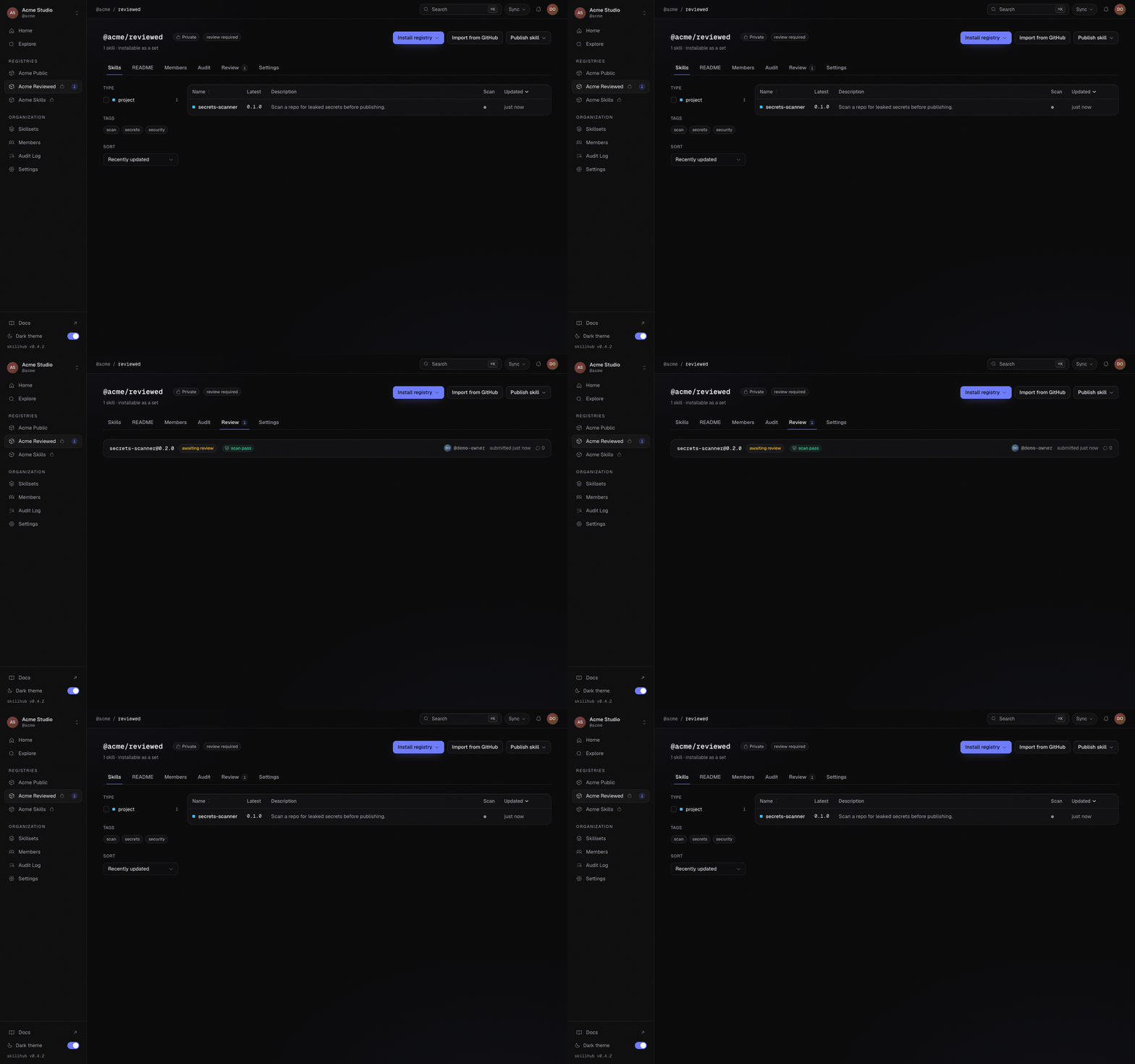
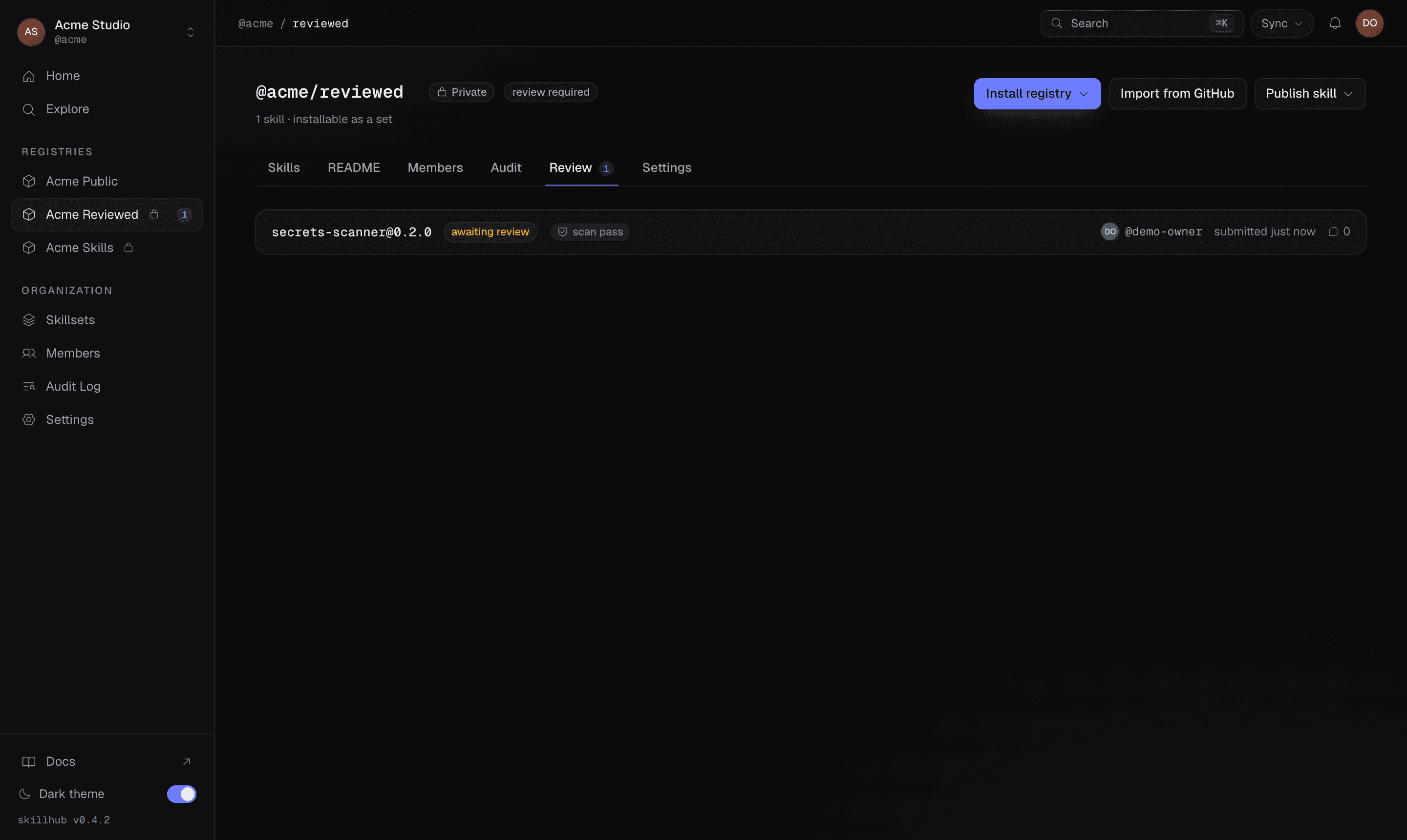
skillhub open @studio/design-systemsThe review queue is a registry-level list of the prerelease versions awaiting promotion. The just-published version shows up here as an awaiting submission:
Step 3 — Read the change as a diff, like code
Because every version is a content-hashed snapshot, a reviewer can read the change between the pending version and what's currently promoted as a server-computed red/green diff — reviewing a skill update exactly like a code review. Open the pending version's comparison to see what actually moved.
The diff has two layouts, and you can toggle between them:
- Unified — additions and removals interleaved in one column.
- Split — the old version on the left, the new on the right, side by side.
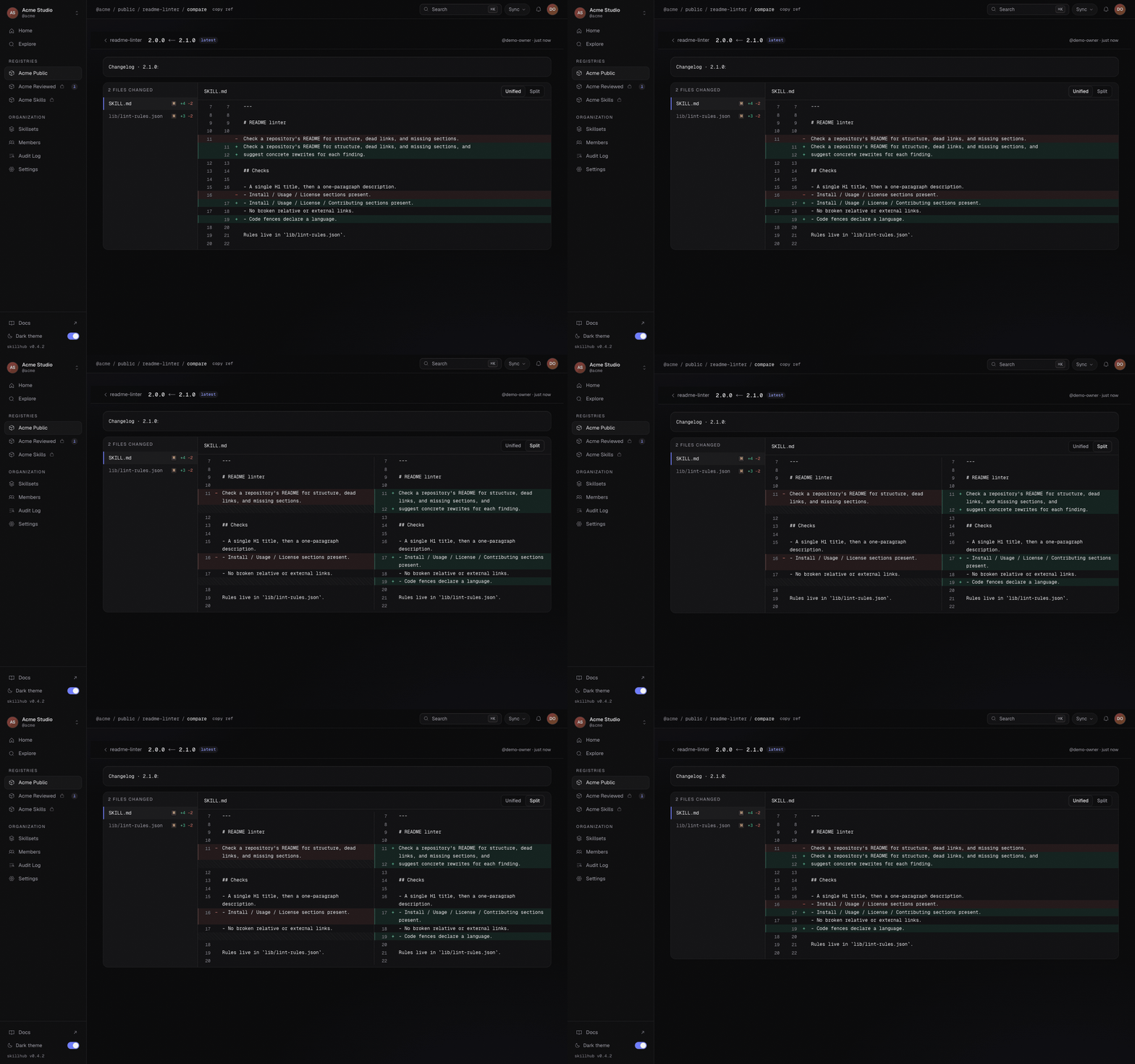
The unified view stacks the change inline — quickest for a short SKILL.md edit, where you just want to read the removed lines against the added ones:
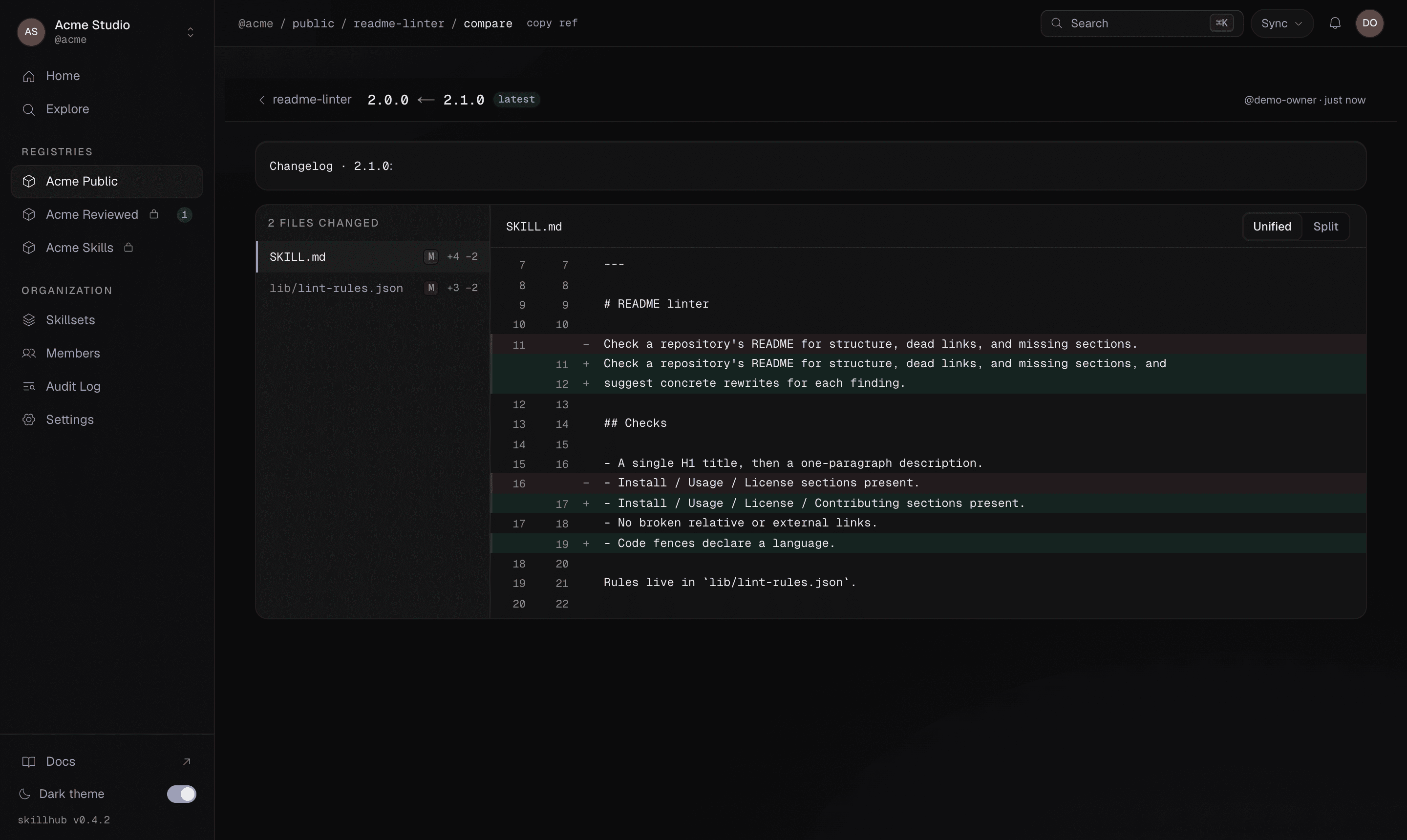
The split view puts the promoted version and the pending version side by side — better for a larger rewrite where you want to scan both columns at once:
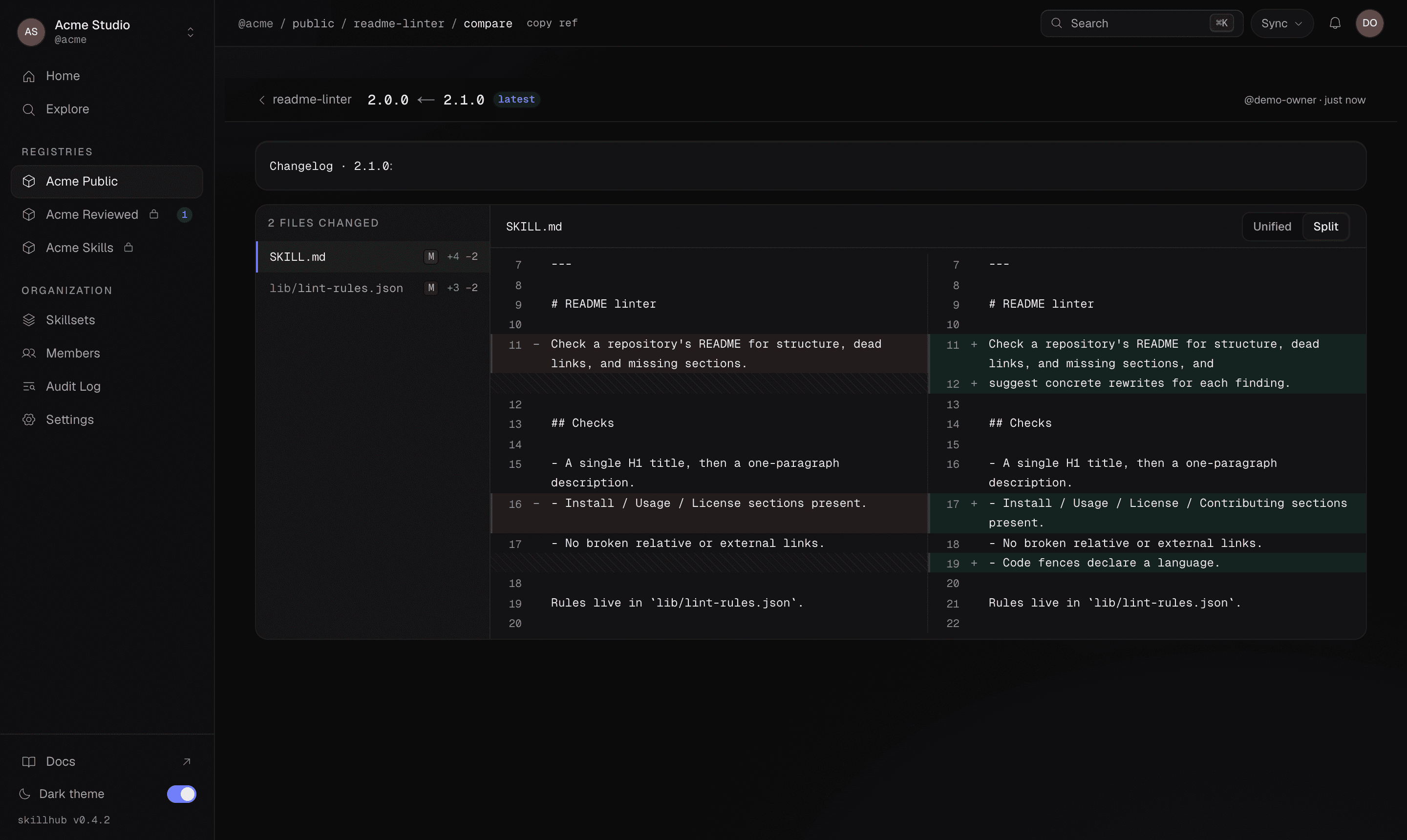
The diff is server-computed from the two stored snapshots — it's the same content the registry hashed on publish, not a re-render. Reviewing versions this way is the subject of its own guide: Browse and compare versions.
Step 4 — Approve (or request changes)
From the queue, an admin acts on the pending version:
- Approve — moves the release tag onto the version, optionally with a
comment. This is the promotion that makes it the new
latest. - Request changes — records the decision on the version and notifies the person who published it that it needs work before it can be promoted.
The admin making either decision must be someone other than the version's publisher. That is what makes the gate a gate: an admin who published a release hands it to another admin, or the registry stops requiring review.
Approval is a dist-tag move: latest lands on the approved version in the
registry's version timeline, exactly like a manual tag move from the Versions
tab.
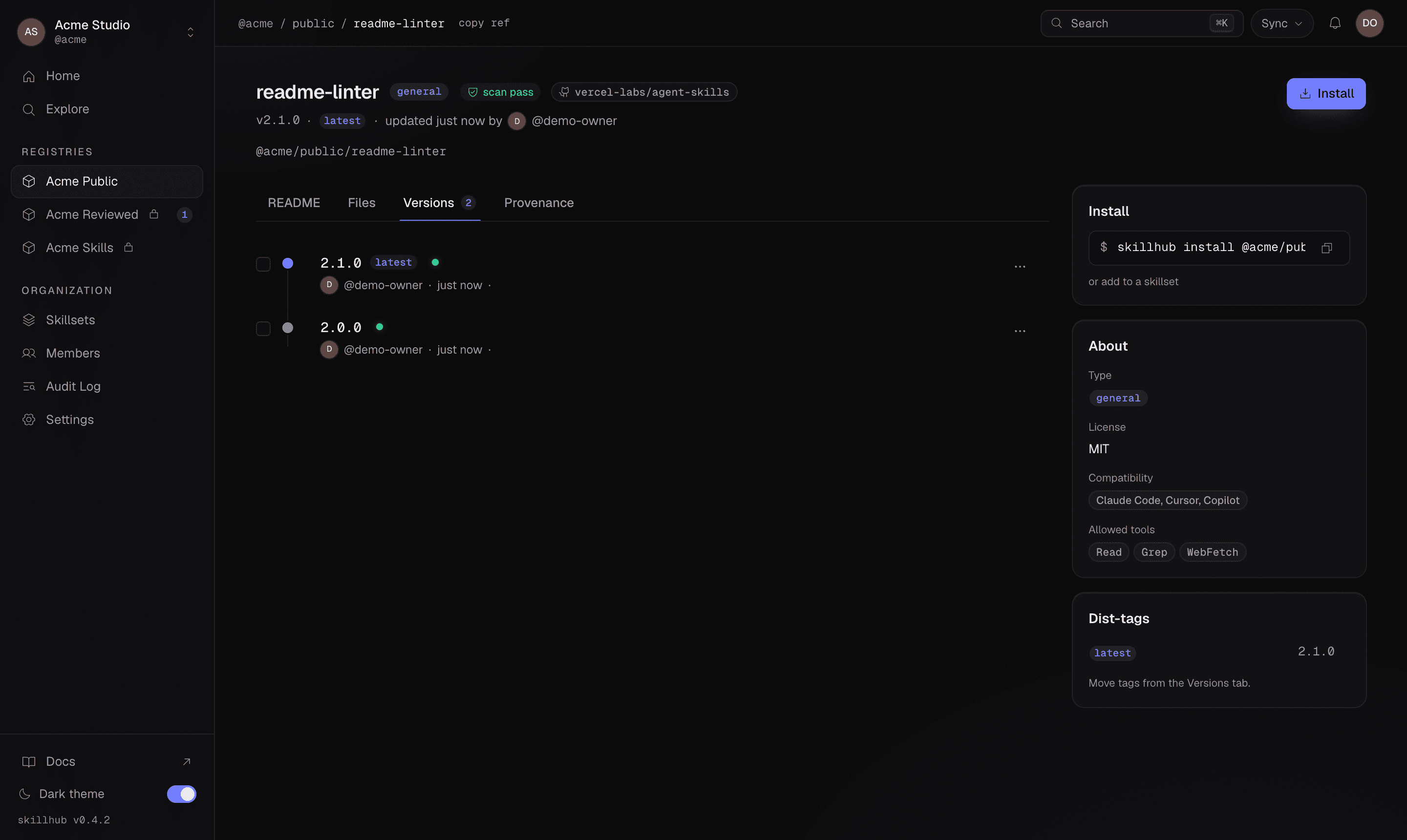
The whole chain — publish, review, and the approval or change request — is recorded in the registry's audit log. Nothing about a promotion is silent; there's a durable record of who approved what, and when.
The CLI side of the two roles
There's no approve subcommand, but the CLI still has a role on each side of the
gate. The publisher publishes; an admin can move the tag from the terminal once
a version is approved, which is the same dist-tag move the dashboard performs on
approval.
Publish the version (and, if useful, tag it as a prerelease for early adopters). The release tag stays withheld regardless:
skillhub publish --to @studio/design-systems
skillhub publish --to @studio/design-systems --tag beta
You can watch a version's promotion state after the fact from the installed
side, too — skillhub list reports the resolved version and its ref for what a
scope actually pulled in.
Once a version is approved, an admin moves the release tag onto the exact version. This is the same promotion the review queue performs on Approve:
skillhub tag @studio/design-systems/tokens-workflow@2.1.0 latestThe move is enforced server-side: release-only tags never point at a prerelease, and on a review-required registry only an admin can land the release tag. Any typed error (wrong role, prerelease target) surfaces verbatim.
Whether a registry requires review is a property of the registry, surfaced as
reviewRequired in its data (visible via skillhub registry list and on the
dashboard). Set it when you create the registry or manage it from the
dashboard — you can't toggle it on a single publish.
Where to go next
Review-required registries
The concept behind this flow and how it reshapes publishing.
Review queue
The dashboard queue in depth: approving, requesting changes, and the audit trail.
Browse and compare versions
Explore a skill's version timeline and read the diff between any two versions.
publish reference
Every flag and the full --json payload, including the withheld tag field.