Review-required registries
Publishers publish prereleases only; admins promote to latest via the dashboard review queue, with the whole chain recorded in the audit log.
Some registries need a second pair of eyes before a version goes live. A
registry can have reviewRequired enabled — a registry-level setting,
surfaced in the registry's data — to gate promotion to the latest channel.
What changes for publishers
On a review-required registry, a publisher can publish and tag
prereleases only. Promoting a version to the latest dist-tag requires
an admin. So publishing still works exactly as usual — you just can't move
latest yourself:
skillhub publish --tag betaA publisher can never move latest on a review-required registry — the version
publishes, but its latest tag stays withheld until an admin approves it.
Publishing as an admin works the same way: a release you publish yourself lands untagged too, and another admin promotes it. Admin is the authority to approve someone else's pending version, not a way to skip the queue with your own.
How it shows up in output
When the review policy withholds the dist-tag, the publish --json payload
reflects it:
- The per-skill
tagfield isnull— the version was published, but the tag did not move. scanStatusmay bependingwhile the server-side scan completes.
The version is safely stored; it simply isn't promoted yet.
The review queue
Reviewers work from the dashboard review queue — a registry-level list of prerelease versions awaiting promotion. Because every version is a content-hashed snapshot, a reviewer can read the change between two versions as a unified, red/green diff — reviewing a skill update just like code:
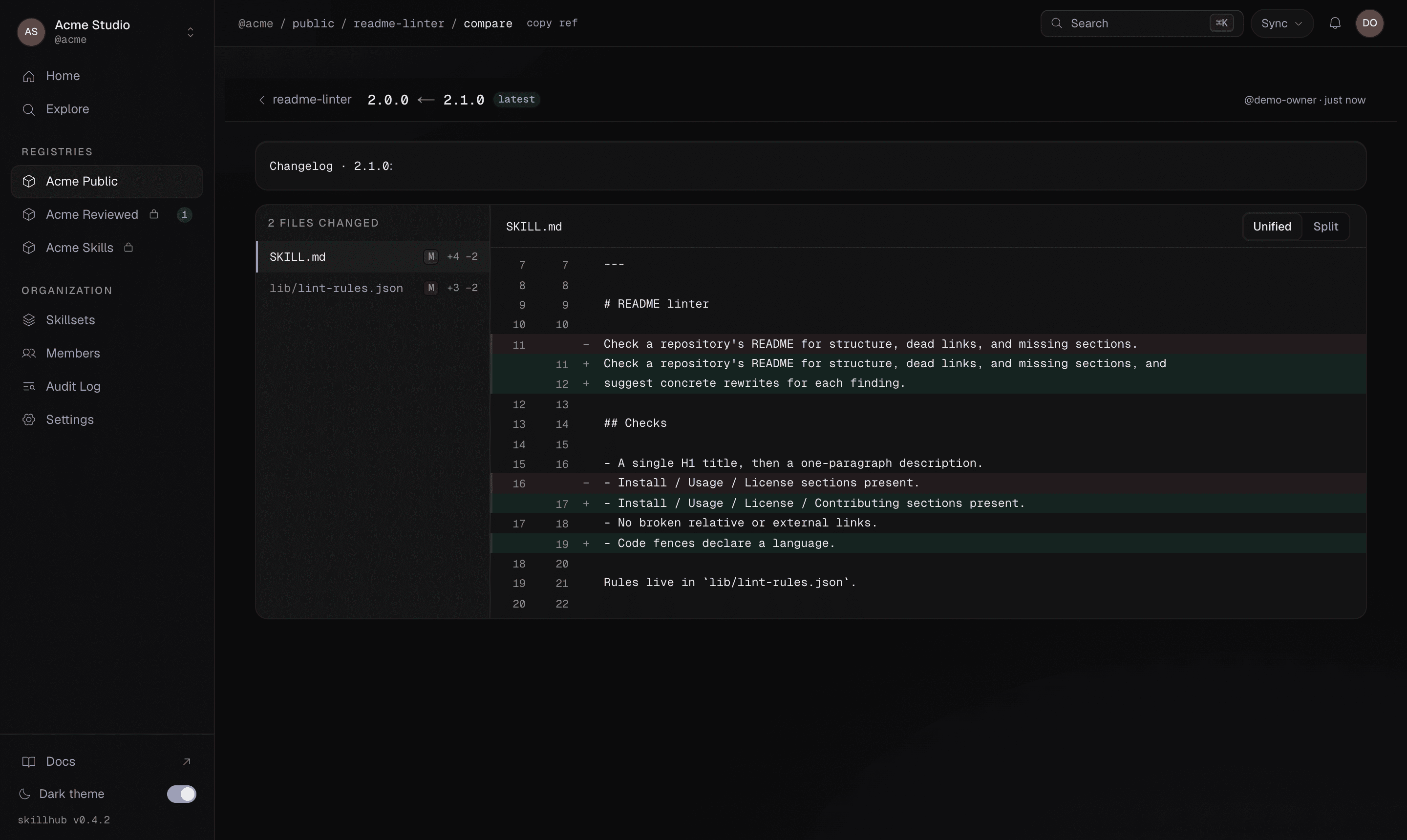
From there an admin can:
- Approve — moves the tag (optionally with a comment).
- Request changes — records the decision on the version and notifies the person who published it.
The whole chain — publish, review, approval or change request — is recorded in the audit log.
You can't review your own version
Both decisions are refused for the version's own publisher, admin or not: a gate its author can open gates nothing. Approving your own release and requesting changes on it both come back with an explanation rather than a generic permission error.
Working solo and don't want a second reviewer? Turn Require review off for that registry in its settings. That is the intended way out — the review gate does not make an exception for the person who happens to hold admin.
No CLI approve command
Review and promotion are a dashboard flow; there is no CLI review or approve
command. The CLI side is publish --tag <prerelease> for publishers and, for
admins, moving the tag once a version is approved:
skillhub tag @studio/design-systems/tokens-workflow@1.2.3 latestTo open the registry's dashboard page:
skillhub open @studio/design-systemsRefs & scopes
The reference grammar for skills, registries, and external sources; version qualifiers; and project vs global install scopes.
Never touch your repo
The core guarantee — gitignored-by-default writes, a managed gitignore block, a canonical store with symlink fan-out, and scoped invisibility.