Publish your first skill
Scaffold, validate, and scan a skill locally, then publish it to a SkillHub registry and see it live.
This guide walks a skill all the way from an empty directory to a live version you can browse in the dashboard. You'll do the authoring on the CLI — where SkillHub checks the skill before anything leaves your machine — then open the published skill page to confirm the version, its scan status, and the install command your teammates will use.
Before you start, make sure you're signed in and that you can publish to your target registry. Publishing needs the right role in the owning org — see Organizations & roles.
The local authoring loop
The whole author-side flow is four commands: skillhub new to scaffold,
skillhub validate to lint against the spec, skillhub scan to run the security
scanner, and skillhub publish to ship. The first three are fast, local, and
network-free — they give you tight feedback while you're still editing. Here is
that loop end to end:
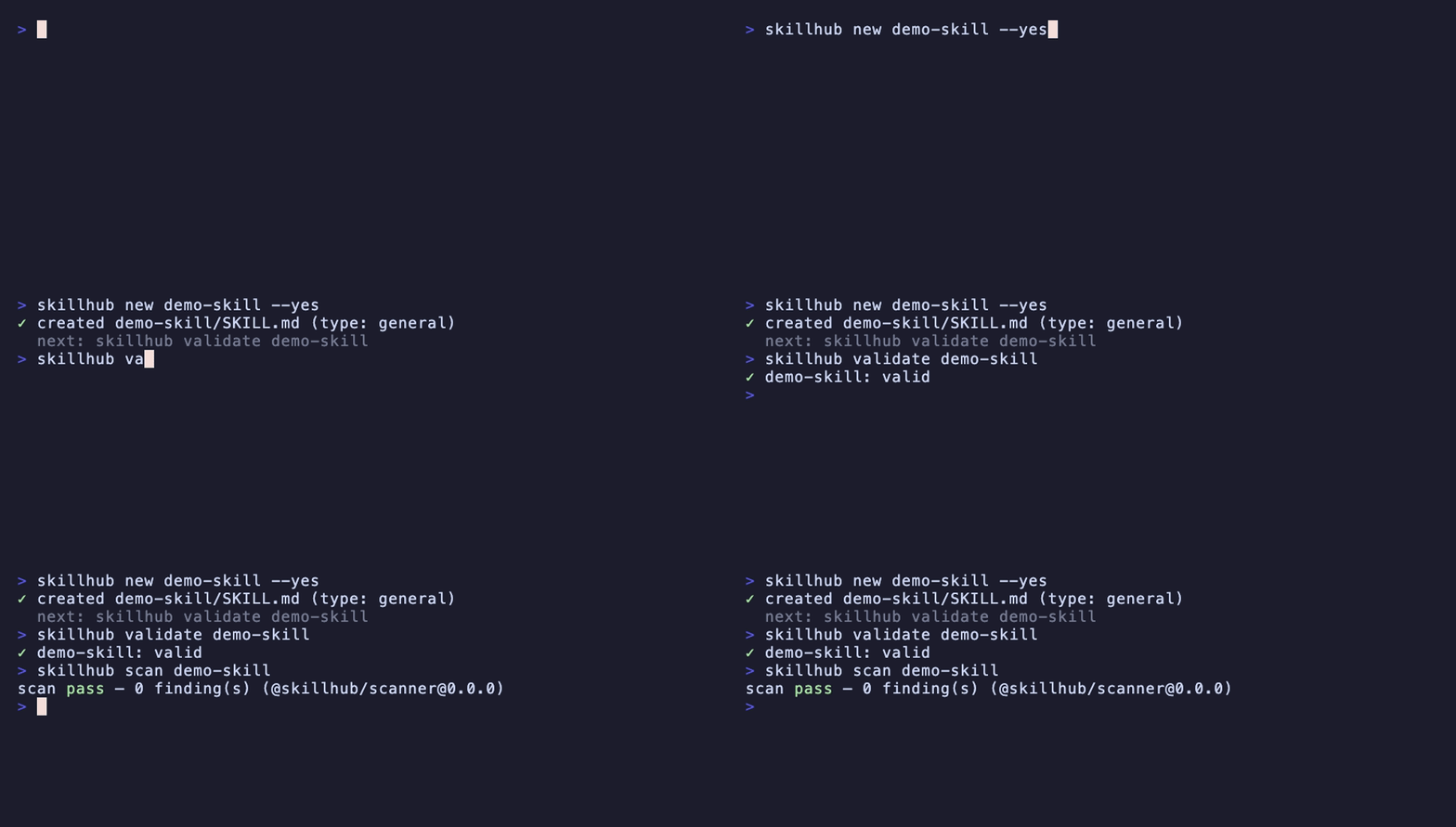
skillhub publish runs the exact same pipeline for you — validate → scan →
pack → upload, in that order. Running skillhub validate and skillhub scan
by hand first is optional; it just moves the feedback earlier. The security
scanner is the same rules engine the server runs at publish-finalize, so a
local verdict can't diverge from the server's — and a blocking scan exits with
code 4 before any network call. Nothing leaves your machine until the skill
is clean.
Scaffold the skill
skillhub new creates a directory containing a spec-valid SKILL.md. The name
is checked against the skill-spec rules — 1–64 characters of [a-z0-9-], no
leading, trailing, or consecutive hyphens — before anything touches the
filesystem, so an invalid name writes nothing.
skillhub new tokens-workflow --type general --description "Design tokens helper"Every skill has a type, one of project, general, or meta, recorded in
its SKILL.md frontmatter. It's required at publish time, so set it now with
--type (or answer the prompt on an interactive terminal; --yes takes the
general default). The --description flag seeds the one-line description in
the frontmatter.
The scaffold writes a single SKILL.md with the frontmatter and a starter body.
Flesh it out with your instructions, and add any scripts, reference files, or
assets the skill needs alongside it.
Validate it locally
skillhub validate lints the skill directory against the spec: frontmatter
fields, the name-matches-directory rule, total size, path safety, symlink
checks, and broken relative links. With no argument it validates the current
directory.
skillhub validate tokens-workflowAny error finding fails validation and exits 1; fix those before moving on.
Two structural findings — entry count and nesting depth — are reported as
warnings, not errors, so they exit 0 on their own. Warnings won't block a
publish, but they're worth reading. (They're overridable at publish time with
--allow-warnings, covered below.)
Scan it locally
skillhub scan runs the security scanner over the directory — looking for
secrets, prompt-injection, exfiltration patterns, and dangerous shell.
skillhub scan tokens-workflowThe report carries a status of pass, warn, or fail. A fail status
(critical or high findings) exits with code 4; warn and pass exit 0
with the findings rendered. Because this is the identical engine the server runs,
a clean local scan means a clean server scan.
For the full rule catalog and severities, see Security scanning.
Publish it
Now ship it. A single-directory publish runs the whole pipeline and is promptless:
skillhub publish tokens-workflow --to @studio/design-systemsskillhub publish validates, scans, packs the directory into a content-hashed
(sha256) tarball, uploads it as a new immutable semver version, and moves a
dist-tag to it. If the local scan blocks, it exits 4 before any network
call — the upload never starts.
A few flags shape the publish:
--to <@owner/registry>— target registry. Overrides thepublishConfigin the manifest. (Publishing has no--accessflag: visibility is a registry-level setting, chosen when the registry is created, not per publish.)--tag <tag>— the dist-tag to move on success. Defaults tolatestper server policy; use--tag betato publish to a different channel.--version <semver>— an exact version, overriding the manifest's version metadata.--bump <patch|minor|major>— for a skill you installed withskillhub, the increment applied to the version the lockfile records.patchis the default, so a bareskillhub publish <installed-skill-dir>ships the next patch.--allow-warnings— acknowledge the benign structural warnings (nesting depth, entry count) and publish anyway.
skillhub publish tokens-workflow --to @studio/design-systems --tag betaPassing multiple directories is the bulk path: each skill is confirmed
individually before it ships, and --yes batches through the confirmations.
(--version can't be combined with a bulk publish — an exact version only makes
sense for one skill.)
Reading the publish result
With --json, the published array reports each version and the tag that
landed. The shape matches the --json contract exactly:
{
  "ok": true,
  "data": {
    "published": [
      {
        "ref": "@studio/design-systems/tokens-workflow",
        "version": "1.0.0",
        "tag": "latest",
        "scanStatus": "pass",
        "warnings": []
      }
    ],
    "skipped": []
  }
}versionis the immutable semver version that was created — it never changes.tagis the dist-tag now pointing at it, ornullif a review policy withheld it (see Review before publish).scanStatusis the server's verdict:pass,warn,fail, orpending.skippedlists any directories whose per-skill confirmation you declined on the bulk path.
See it live in the dashboard
Once the version is up, the skill has its own page in the registry. Open it from
the registry's skill list, or jump straight there — the page renders the skill's
README/SKILL.md, the install command consumers copy, the scan status
for the published version, and the dist-tags that point at it, plus an About
panel with the skill type and compatibility details.
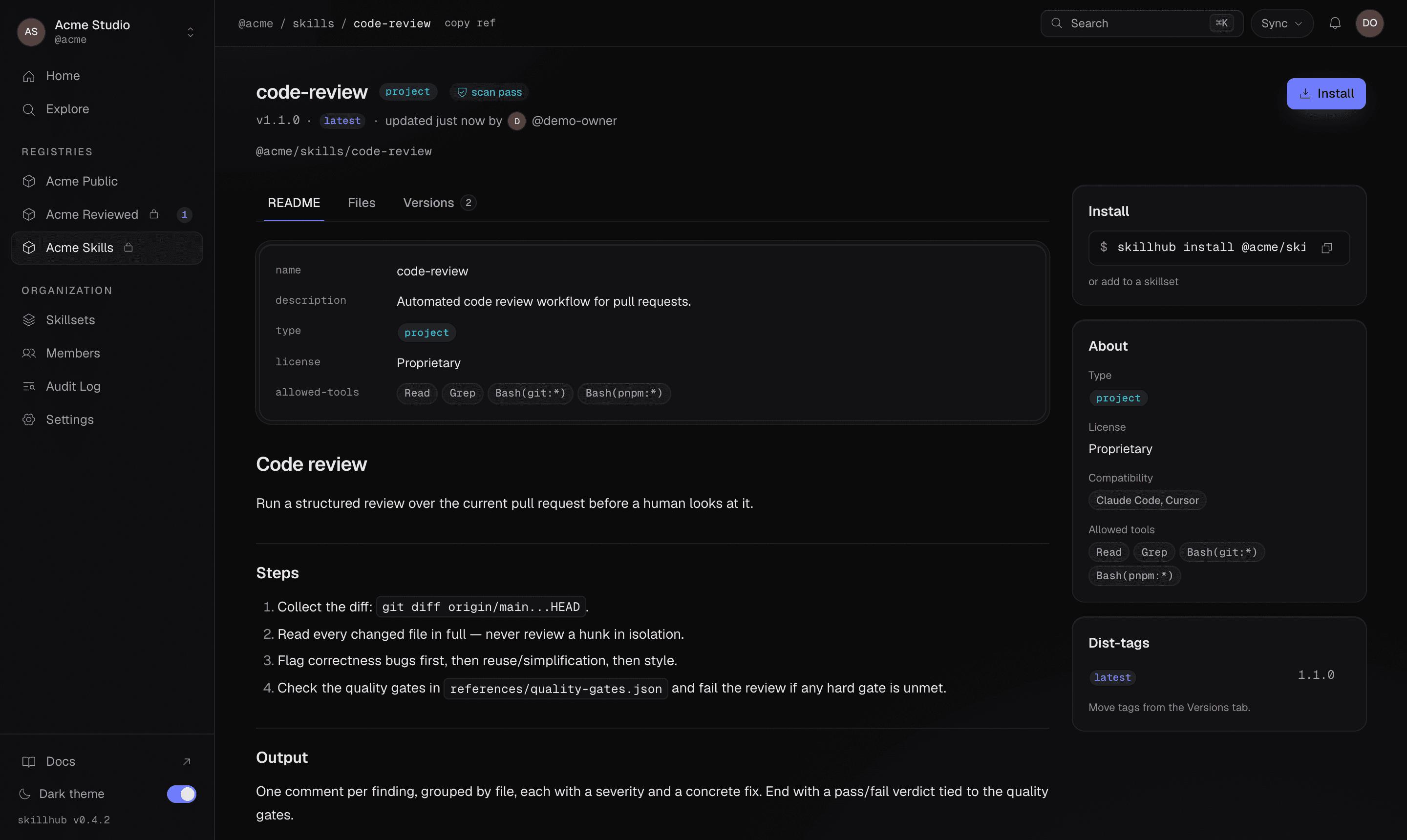
The install command on this page is what a teammate runs to pull the skill into their own project or global scope — the consumer side of the loop. Walk that path in Install and sync a registry.
The skillhub binary installs from npm with npm i -g @uzolab/skillhub and points at the
hosted registry out of the box. The commands, flags, and --json shapes on this
page are accurate to the shipped CLI.
What's next
Publishing workflow
The scaffold → validate → scan → publish loop in reference detail.
Versions & dist-tags
How immutable versions and mutable channels resolve.
Review before publish
Publishing into a registry that gates the latest tag for an admin.
Browse & compare versions
Read a skill's version history and diff two releases.