Review-required flow
Publishing into a registry that gates the latest tag — publisher prereleases, admin promotion, and the review queue.
Some registries turn on review. On a review-required registry, publishers
can ship versions but can't promote them to latest on their own — an admin
approves the promotion through the dashboard. This gives a team a gate between
"published" and "what everyone installs."
What changes for publishers
A registry with reviewRequired enabled restricts the latest dist-tag.
Publishers can:
- Publish new versions.
- Move prerelease dist-tags (like
beta).
Publishers cannot move latest — that's an admin action, and one an admin
takes on someone else's version: a release lands untagged no matter who
publishes it, admins included. So the standard move is to publish under a
prerelease tag:
skillhub publish --tag beta --to @studio/design-systemsPublishing a skill you installed
When the directory you publish is one skillhub installed, the version is chosen
for you. skillhub publish .skillhub/skills/tokens-workflow on a
review-required registry ships the next release — 1.4.3 from a store holding
1.4.2 — derived from the version the lockfile records. It lands untagged,
and that withheld tag is the review itself: an admin moving latest onto it is
the approval, and that move is legal only onto a release.
The number is settled against the registry's own version list, so a version a teammate published from another machine, or one that was published and later yanked, is stepped past rather than collided with.
skillhub records the version it published, so a later run derives the next
number from there. The one waiting for review is never re-attempted.
Sending a whole session's edits for review
skillhub sync does the same thing across every skill you've edited. On a
terminal it lists them and you pick; skillhub sync --publish sends all of them:
skillhub sync --publish◷ @studio/design-systems/tokens-workflow@1.4.3 — accepted, HELD FOR REVIEW, NOT TAGGED
A registry admin moves the tag; that move is the approval.
✓ up to date (4 skills)Each candidate is reported as accepted, held for review — not as a failure,
and not as still behind. On the next run the skill appears under pendingReview
rather than modified, with the version this scope installs alongside the one
waiting for an admin:
◷ tokens-workflow@1.4.3 is published and awaiting review (not tagged);
  1.4.2 is what this scope installs until an admin moves the tag.
That state is read from the lockfile, so it costs no network call and it clears
itself: once the tag moves and a sync installs the promoted version, the
subscription has caught up and the notice stops. Your edits are never
overwritten while it lasts — the pull half resolves latest, which still points
at the approved release.
A sync that can't ask and wasn't given --publish publishes nothing, so a
scripted sync never sends anything for review.
Reading the publish result
When the review policy withholds the latest tag, the publish still succeeds —
the version exists — but the tag doesn't move. In the result:
tagisnull(the version published, but the requested tag was withheld).statusisheld-for-review, which states the outcome instead of leaving it to be inferred from the null tag.scanStatusmay bependingwhile the server-side scan is still running.
{
  "ok": true,
  "data": {
    "published": [
      { "ref": "@studio/design-systems/tokens-workflow", "version": "2.0.0", "tag": null, "status": "held-for-review", "scanStatus": "pending" }
    ],
    "skipped": []
  }
}
A null tag here isn't an error — it means "the version is up, awaiting
review." The version row exists, so that number is spent: the lockfile records
it and the next derived version starts above it rather than colliding with it.
The review queue
Reviewers work from the dashboard review queue: a per-registry list of the versions waiting to be promoted — every non-yanked version no dist-tag points at. From there an admin can:
- Approve — moves the tag to the version (optionally with a comment).
- Request changes — records the decision and notifies the person who published the version that something needs fixing.
Whoever publishes a version cannot make either decision on it — including an admin who published it themselves. If a registry shouldn't need a second pair of eyes, turn Require review off for it instead.
To decide, a reviewer compares the pending version against what's currently promoted. The dashboard renders a server-computed diff of the changed files, so an admin can see exactly what moves before they approve it:
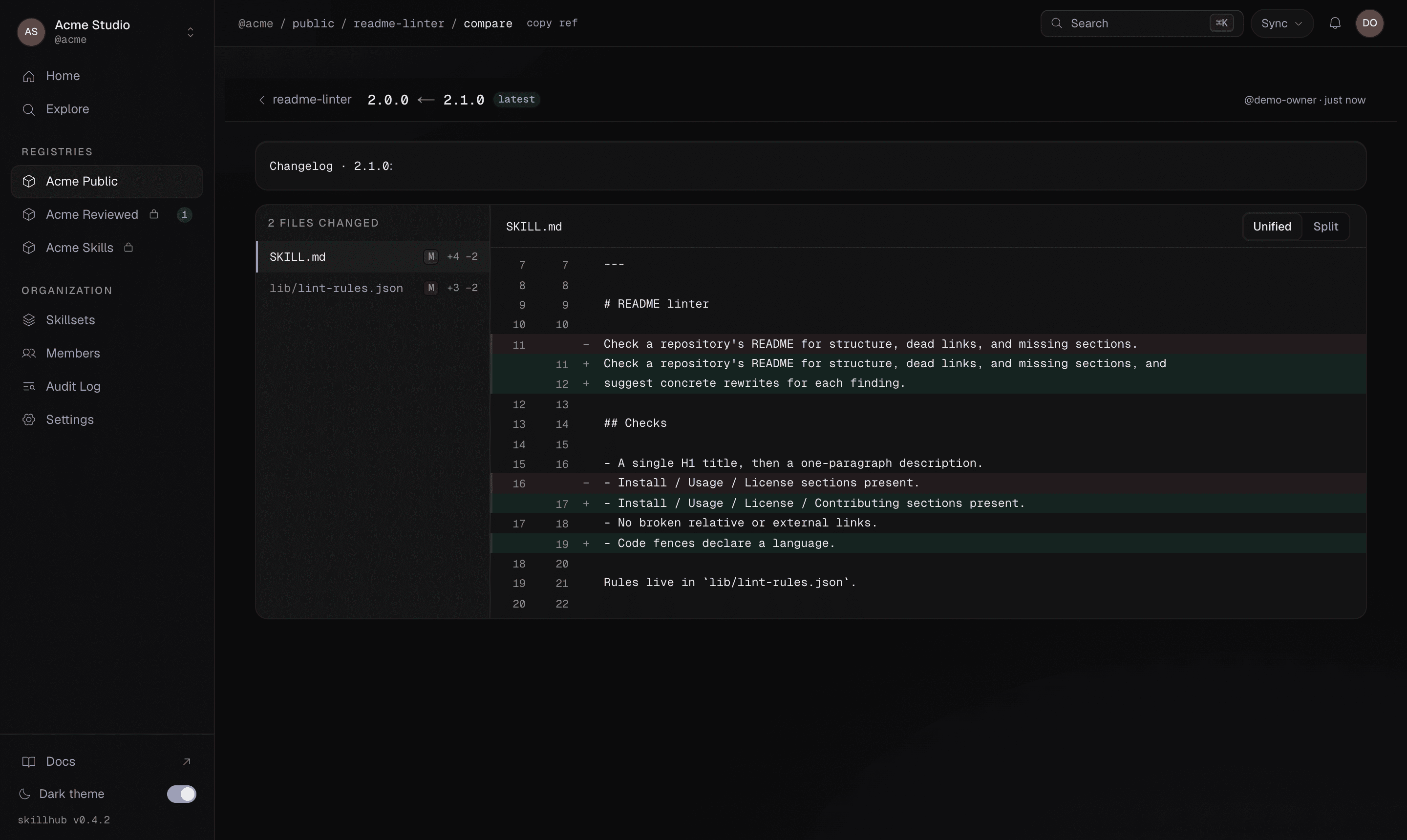
The whole chain is recorded in the registry's audit log.
Promoting to latest
There is no CLI review or approve command — approval happens in the dashboard. The CLI side of the flow is just two pieces:
- Publishers ship prereleases with
publish --tag <prerelease>. - Admins promote a reviewed version with
skillhub tag:
skillhub tag @studio/design-systems/tokens-workflow@2.0.0 latestWhether a registry requires review is surfaced as reviewRequired in the
registry's data (visible via registry list and on the dashboard). Set it when
you create the registry or manage it from the dashboard.
Related
- Versions & dist-tags — the version/tag split this flow builds on.
- Registries & org publishing — the roles that decide who can promote.