Skills & versions
Skills as packages, the type taxonomy, immutable content-hashed versions, mutable dist-tags, and the deprecate/yank/unpublish lifecycle.
A skill is a named package inside a registry. Its full reference is
@owner/registry/skill — for example
@studio/design-systems/tokens-workflow. A skill packages a SKILL.md file
together with any scripts, references, and assets it needs.
Skill types
Every skill has a type, one of:
- project — tied to a particular project's conventions.
- general — broadly reusable.
- meta — operates on skills or workflows themselves.
The type lives in the SKILL.md frontmatter under metadata (e.g.
metadata.type: general) and is required at publish time — the registry
enforces it. You can also set it at publish with --type.
Immutable versions
Every publish creates an immutable semver version: a content-hashed
(sha256) tarball snapshot of the skill at that moment. Once published, a version
never changes — installing 1.2.3 always yields exactly the same bytes.
Published versions are immutable. The bytes behind a given semver version are frozen forever — a content hash lets installs verify they resolved exactly what the registry recorded.
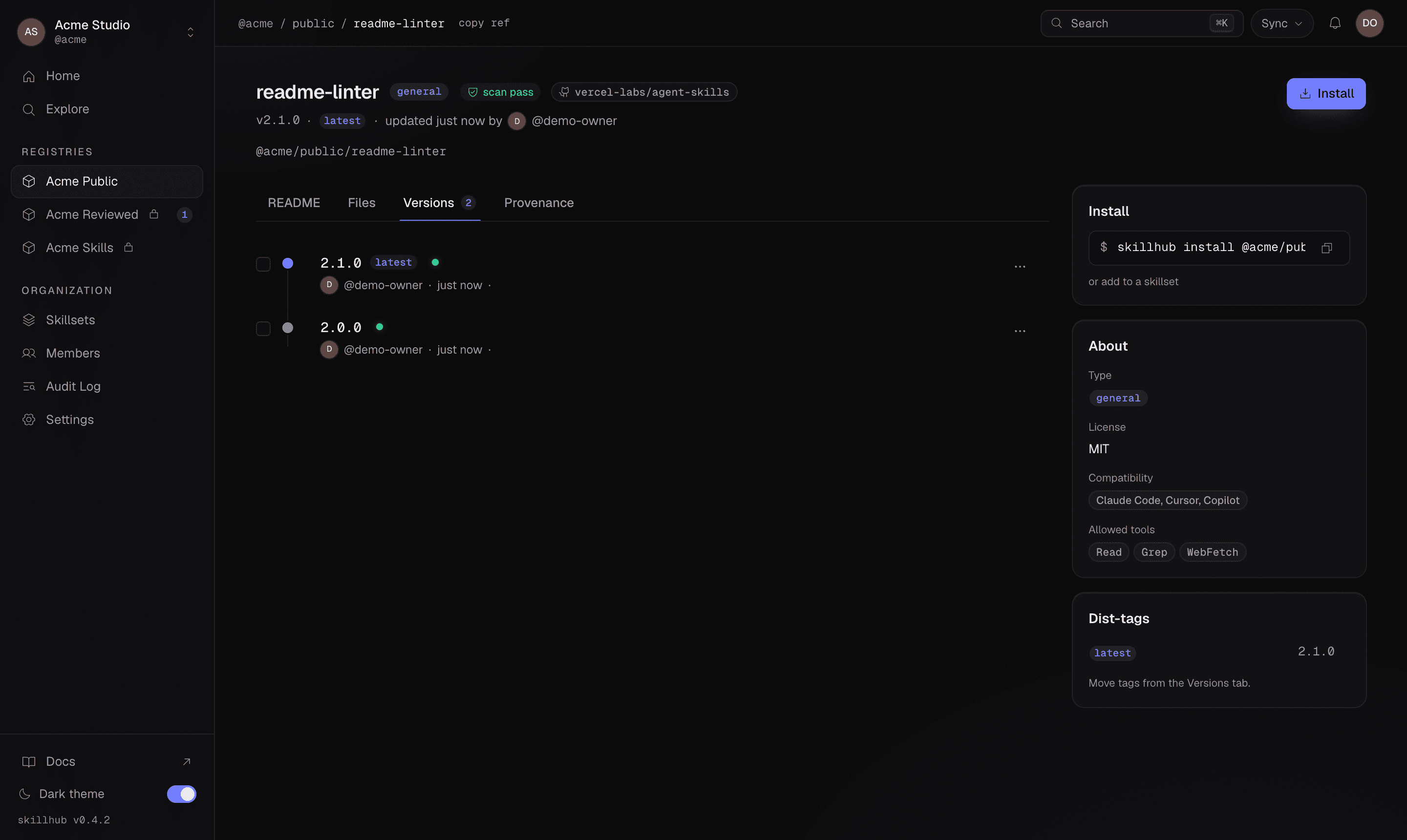
Version history is linear per skill: a simple, ordered sequence of releases. There are no branches and no merges — it is deliberately simpler than git. Each version appears on the skill's Versions tab alongside the dist-tags pointing at it:
Mutable dist-tags
While versions are frozen, dist-tags are mutable pointers to versions.
Common tags include latest and beta, plus any custom tag you like. Installs
resolve either a dist-tag or a semver range, so a tag lets you name a channel
without callers knowing the exact version behind it.
Set a tag when you publish, or move an existing tag to a version:
skillhub publish --tag beta
skillhub tag @studio/design-systems/tokens-workflow@1.2.3 latest
By default a publish moves the latest tag (subject to server policy and any
review requirement).
Lifecycle
As a skill evolves, you have a few ways to signal its status:
- Deprecate a skill — mark the whole skill deprecated, optionally with a message pointing to its replacement.
- Yank a version — mark one specific version as unsafe to use by appending
@<version>to the ref. - Unpublish a version — permanently remove a version. This is admin-only and time-limited (a short window after publish).
skillhub deprecate @studio/design-systems/old-skill "Use tokens-workflow instead"
skillhub deprecate @studio/design-systems/tokens-workflow@1.0.0 "Bad release"
skillhub unpublish @studio/design-systems/tokens-workflow@1.2.3
Renaming a skill creates redirect aliases, so existing references keep
resolving. Consumers see all of this through skillhub outdated, which
surfaces deprecated, renamed, and yanked status for each installed skill.