import
Copy an external skill into a registry with recorded provenance.
skillhub import copies an external skill into a registry, recording its
provenance (the source URL and the upstream content hash). Optionally re-check
upstream drift right after importing with --check-drift.
That recorded provenance surfaces on the skill's Provenance tab — the repository, ref, subpath, and upstream commit hash the copy came from:
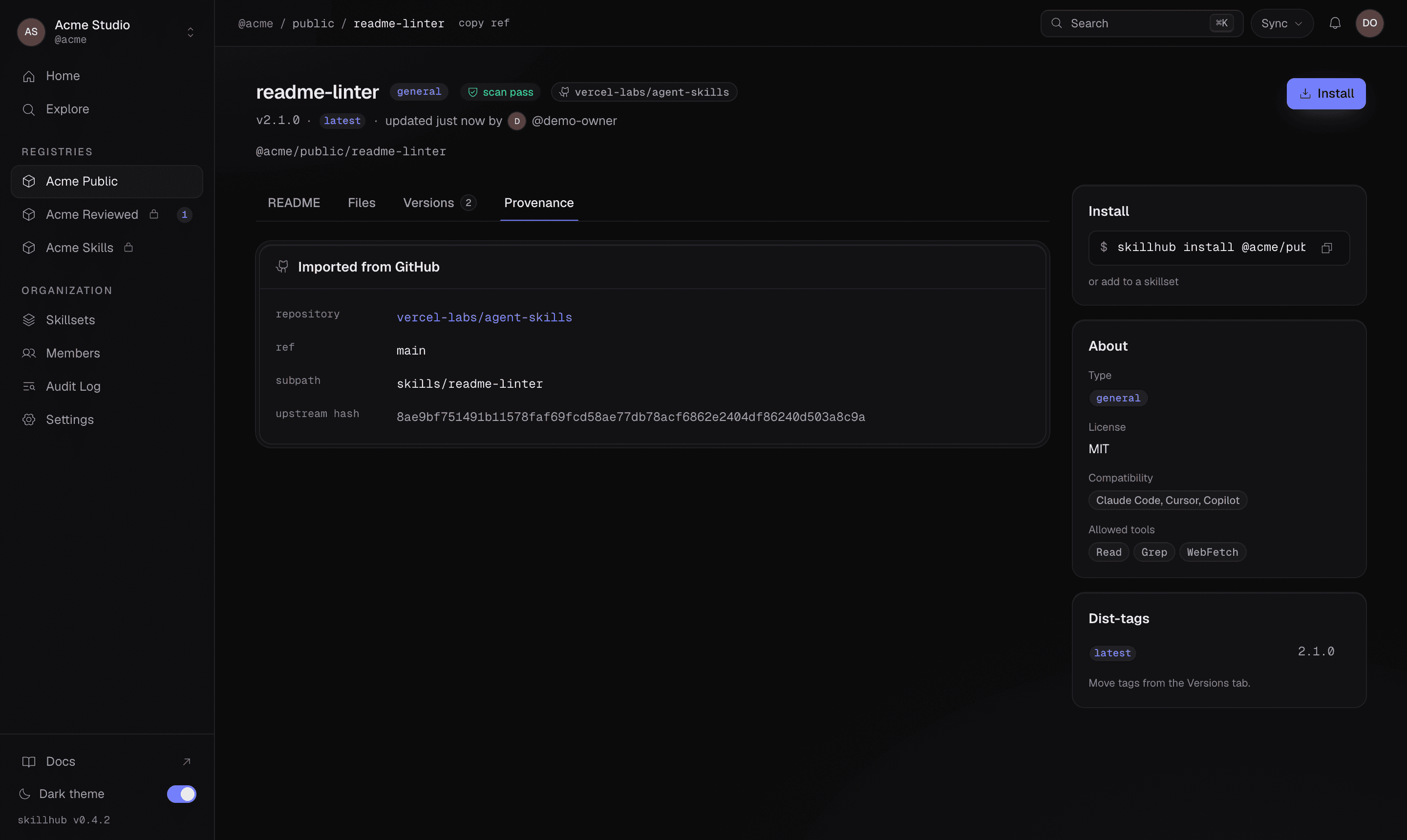
Import copies the skill into a registry you own so it can be scanned, versioned, and installed like any first-party skill — while keeping a verifiable link back to where it came from. See refs & scopes for the source-ref grammar.
Synopsis
skillhub import <source> [--to <@owner/registry>] [--skill <name>] [--check-drift] [--allow-warnings]Flags
| Flag | Description |
|---|---|
--to <@owner/registry> | Target registry to copy the skill into (@owner/registry) |
--skill <name> | Import only this discovered skill (repeatable); disambiguates a multi-skill source |
--check-drift | After importing, re-resolve the source and report whether upstream changed |
--allow-warnings | Acknowledge benign structural warnings (shape and content-length limits) and import without prompting |
Examples
skillhub import sh:vercel-labs/agent-skills/changelog --to @studio/general
skillhub import gh:owner/repo#some-skill --to @studio/general --check-drift
JSON output
With --json, the data object contains:
source,targetRegistry,sourceKind,upstreamHash.imported[]— each{ ref, version, provenance{ sourceKind, sourceUrl, sourceRef (string|null), upstreamHash, importedAt } }.failed[]— each{ ref, code, message }: the skills in the batch that were not written.codeisscan-blocked(a blocking security finding) orversion-exists(that version is already in the target registry).drift—{ drifted (bool), recordedHash, currentHash }ornull.
Partial success
The security scan gates the copy per skill, not per batch. A skill whose
content trips a blocking finding comes back in failed[] with
code: "scan-blocked" and is never written — and never overridable — while its
clean siblings import normally. One flagged skill therefore costs you that skill,
not the whole repository's worth.
A batch that lands at least one skill is a success (exit 0) and lists the
blocked ones alongside. A batch where nothing landed exits non-zero, so a
script never reads an all-failed import as a completed one — exit 4 (integrity)
if any failure was a scan block, and exit 1 only when every failure was a
benign version conflict. With --json the error envelope carries the full result
as details, so a machine consumer still sees which skills failed and why.